Square POS Pricing 2025: Complete Cost Breakdown and Hidden Fees
Last Updated: January 2025
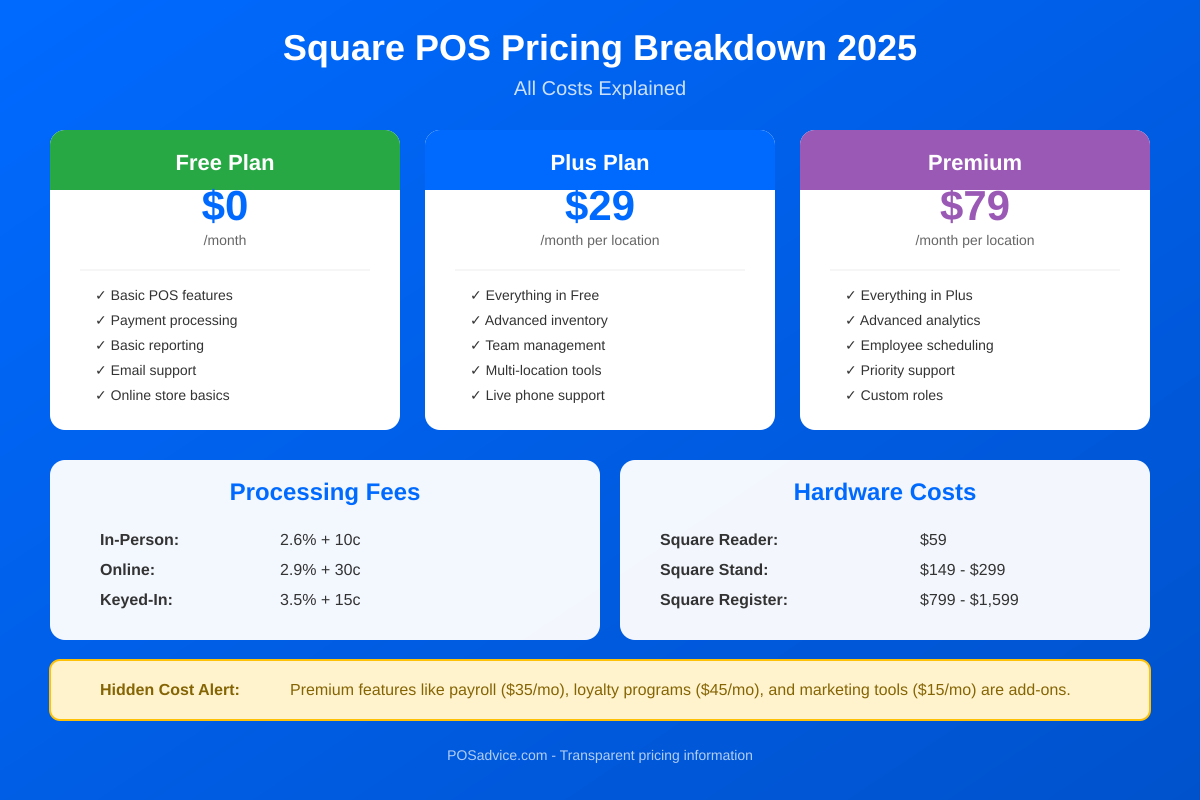
Square’s pricing model is designed for simplicity and transparency, but understanding the true cost of using Square requires looking beyond the “free” headline. While Square does offer a genuinely free POS plan with no monthly fees, transaction processing fees, hardware costs, and optional add-ons can add up quickly.
This comprehensive guide breaks down every cost associated with Square in 2025, helping you calculate the true total cost of ownership for your business. We will cover all plans, processing fees, hardware options, and the hidden fees you should watch for.
Quick Overview: Square Pricing at a Glance
| Component | Cost |
|---|---|
| Basic POS Software | Free ($0/month) |
| In-Person Transaction Fee | 2.6% + $0.15 per transaction |
| Online Transaction Fee | 2.9% + $0.30 per transaction |
| Keyed-In Transaction Fee | 3.5% + $0.15 per transaction |
| Hardware (Entry-Level) | $0-$49 |
| Hardware (Full Setup) | $149-$799 |
| Plus Plans | $29-$89 per month |
| Contracts/Cancellation Fees | None |
| PCI Compliance Fees | None (included free) |
Square Free Plan: What You Actually Get
Square’s free plan is one of the most generous in the industry, including features that competitors charge monthly fees for. Here is everything included at no monthly cost:
Included in Square Free
- Full POS Application: Complete point-of-sale software for iOS and Android
- Unlimited Products: Add as many items as you need
- Basic Inventory Management: Track stock levels and get low-stock alerts
- Customer Directory: Store customer information and purchase history
- Basic Sales Reporting: Track sales by time period, item, and category
- Digital Receipts: Email or text receipts to customers
- Online Store: Free Square Online website
- Invoicing: Send unlimited invoices
- Team Management: Basic employee clock-in/out
- Gift Cards: Physical and digital gift card support
- Dispute Management: Chargeback support
- Next-Day Deposits: Funds available next business day
What the Free Plan Does NOT Include
- Kitchen Display System (KDS)
- Advanced inventory features (purchase orders, vendor management)
- Seat and course management for restaurants
- Advanced team permissions
- Loyalty programs ($45/month add-on)
- Payroll ($35/month + $6/employee)
- Marketing automation ($15/month)
- Priority customer support
Square Plus and Premium Plans
For businesses needing more advanced features, Square offers tiered subscription plans across different business categories.
Square for Retail Plans
| Plan | Monthly Cost | Key Features |
|---|---|---|
| Free | $0/month | Basic POS, inventory, customer directory |
| Plus | $89/month/location | Advanced inventory, purchase orders, vendor management, barcode printing |
| Premium | Custom pricing | Custom processing rates, dedicated support, advanced features |
Square for Restaurants Plans
| Plan | Monthly Cost | Key Features |
|---|---|---|
| Free | $0/month | Basic POS, menu management, basic reporting |
| Plus | $69/month/location | KDS, seat management, reopen closed checks, advanced reporting |
| Premium | $165/month/location | 24/7 support, custom pricing, advanced features |
Square Appointments Plans
| Plan | Monthly Cost | Key Features |
|---|---|---|
| Free | $0/month | Basic booking, calendar, reminders (1 staff) |
| Plus | $29/month | Multiple staff, no-show protection, resource management |
| Premium | $69/month | Waitlists, classes, multiple locations, advanced reporting |
General Square Plans (Non-Industry Specific)
| Plan | Monthly Cost | Key Features |
|---|---|---|
| Free | $0/month | Core POS features |
| Plus | $29/month | Advanced features, customization |
| Premium | $79/month | Full feature access, priority support |
Square Transaction and Processing Fees
Transaction fees are where Square makes most of its revenue. Understanding these fees is critical for calculating your true costs.
Standard Processing Fees (Updated February 2025)
| Payment Type | Fee | When It Applies |
|---|---|---|
| In-Person (Tap, Dip, Swipe) | 2.6% + $0.15 | Card present at checkout |
| Online Payments | 2.9% + $0.30 | Website or e-commerce transactions |
| Manually Keyed | 3.5% + $0.15 | Card number entered by hand |
| Square Invoices (Card) | 3.3% + $0.30 | Customer pays invoice with card |
| Square Invoices (ACH) | 1% (min $1) | Customer pays via bank transfer |
| Payment Links | 3.3% + $0.30 | Customer uses a payment link |
| Afterpay (BNPL) | 6% + $0.30 | Customer uses buy now pay later |
Processing Fee Examples
Example 1: Coffee shop with $5 average transaction
- In-person fee: 2.6% of $5 = $0.13 + $0.15 = $0.28 per transaction
- Effective rate: 5.6% of transaction value
Example 2: Retail store with $75 average transaction
- In-person fee: 2.6% of $75 = $1.95 + $0.15 = $2.10 per transaction
- Effective rate: 2.8% of transaction value
Example 3: Online store with $150 average order
- Online fee: 2.9% of $150 = $4.35 + $0.30 = $4.65 per transaction
- Effective rate: 3.1% of transaction value
Key Insight: The fixed per-transaction fee ($0.15-$0.30) has a larger impact on low-value transactions. Businesses with small average tickets pay a higher effective rate.
Custom Pricing for High-Volume Businesses
If your business processes over $250,000 in annual card sales, you may qualify for custom pricing with negotiated rates. Contact Square’s sales team to discuss volume discounts.
Square Hardware Costs
Square offers a range of hardware options from free readers to complete countertop solutions. All hardware is one-time purchase with no rental fees.
Card Readers
| Device | Price | Features |
|---|---|---|
| Magstripe Reader | Free (first one) | Swipe only, connects to phone/tablet |
| Square Reader (Contactless + Chip) | $49 | Tap, dip, and swipe, Bluetooth |
All-in-One Devices
| Device | Price | Features |
|---|---|---|
| Square Stand | $149 or $14/mo for 12 mo | iPad mount with integrated reader |
| Square Terminal | $299 or $27/mo for 12 mo | Portable all-in-one with receipt printer |
| Square Register | $799 or $39/mo for 24 mo | Dual-screen countertop terminal |
Mobile Devices
| Device | Price | Features |
|---|---|---|
| Square Handheld | Varies | Mobile POS with camera and barcode scanner |
Accessories
| Accessory | Price |
|---|---|
| Cash Drawer | $119-$169 |
| Receipt Printer | $299-$399 |
| Kitchen Printer | $349-$499 |
| Barcode Scanner | $119-$229 |
| Label Printer | $199-$299 |
Hardware Bundles
Square offers pre-configured hardware bundles for different business types:
- Retail Starter Kit: Square Stand + Cash Drawer + Receipt Printer (~$567)
- Restaurant Kit: Square Terminal + Kitchen Printer (~$648)
- Full Counter Setup: Square Register + Cash Drawer + Receipt Printer + Barcode Scanner (~$1,346)
Square Add-On Services and Costs
While the core POS is free, many valuable features come as paid add-ons:
Marketing and Customer Engagement
| Add-On | Monthly Cost | Features |
|---|---|---|
| Square Loyalty | $45/location | Points-based rewards, digital punch cards |
| Square Marketing | $15+ | Email campaigns, automated marketing |
| Text Message Marketing | $10+ | SMS campaigns to customers |
Business Operations
| Add-On | Monthly Cost | Features |
|---|---|---|
| Square Payroll | $35 + $6/employee | Full payroll processing, tax filing |
| Square Team Management | Included in Plus plans | Advanced scheduling, permissions |
| Square Invoices Plus | $20/month | Custom templates, milestone payments |
Advanced Features
| Add-On | Monthly Cost | Features |
|---|---|---|
| Kitchen Display System | Included in Plus plans | Digital order display for kitchen |
| Square Online Premium | $12-$72/month | Advanced e-commerce features |
| Delivery (in-house) | $0.50/order | On-demand delivery driver network |
Hidden Fees to Watch For
Square is known for transparent pricing, and officially states they never charge monthly fees, PCI compliance fees, cancellation fees, or hidden POS software fees. However, there are some costs that may surprise you:
Not Hidden, But Often Overlooked
- Chargebacks: If a customer disputes a charge, there may be fees associated with the dispute process
- Instant Deposits: 1.75% fee for same-day fund access (standard next-day deposits are free)
- Third-Party App Fees: Apps from the Square App Marketplace may have their own subscription fees
- Hardware Replacement: Damaged equipment requires repurchase at full price
- International Transactions: Additional fees may apply for cross-border payments
Account Risks
- Account Holds: Square may temporarily freeze funds if unusual activity is detected
- High-Risk Business Limits: Some industries face higher scrutiny and potential account termination
- Reserve Requirements: New accounts or high-volume increases may trigger reserve requirements
What Square Does NOT Charge
- No monthly fees on Free plan
- No setup or activation fees
- No PCI compliance fees
- No early termination fees
- No long-term contracts
- No gateway fees
Total Cost Calculator: Real-World Scenarios
Let us calculate the true first-year cost for different business types:
Scenario 1: Small Coffee Shop
Profile: 150 transactions/day, $8 average ticket, Free plan
| Cost Component | Monthly | Annual |
|---|---|---|
| Software (Free plan) | $0 | $0 |
| Processing (150 x 30 x $8 x 3.48%*) | $1,253 | $15,036 |
| Hardware (Square Stand + Reader) | – | $198 |
| Loyalty (optional) | $45 | $540 |
| Total Without Loyalty | $1,270 | $15,234 |
| Total With Loyalty | $1,315 | $15,774 |
*Effective rate for $8 transactions: 2.6% + ($0.15/$8) = 3.48%
Scenario 2: Retail Boutique
Profile: 40 transactions/day, $85 average ticket, Plus plan
| Cost Component | Monthly | Annual |
|---|---|---|
| Software (Retail Plus) | $89 | $1,068 |
| Processing (40 x 30 x $85 x 2.78%*) | $2,839 | $34,068 |
| Hardware (Square Register + Accessories) | – | $1,117 |
| Total First Year | $2,928 | $36,253 |
*Effective rate for $85 transactions: 2.6% + ($0.15/$85) = 2.78%
Scenario 3: Restaurant
Profile: 100 transactions/day, $28 average ticket, Plus plan
| Cost Component | Monthly | Annual |
|---|---|---|
| Software (Restaurant Plus) | $69 | $828 |
| Processing (100 x 30 x $28 x 3.14%*) | $2,638 | $31,656 |
| Hardware (2 Terminals + Kitchen Printer) | – | $947 |
| Loyalty (optional) | $45 | $540 |
| Total Without Loyalty | $2,707 | $33,431 |
| Total With Loyalty | $2,752 | $33,971 |
*Effective rate for $28 transactions: 2.6% + ($0.15/$28) = 3.14%
Square vs Competitors: Pricing Comparison
| Feature | Square | Toast | Clover | Shopify POS |
|---|---|---|---|---|
| Free Plan | Yes | Yes (starter) | No | No |
| Starting Monthly | $0 | $0-$69 | $14.95 | $29 |
| In-Person Rate | 2.6% + $0.15 | 2.49% + $0.15 | 2.3% + $0.10 | 2.4%-2.7% + $0.10 |
| Hardware Required | No | Yes (Toast) | Yes (Clover) | No |
| Contracts | No | Yes (2 years) | Varies | No |
| PCI Fees | None | None | None | None |
When Square is More Expensive
- High-volume businesses may get better rates with traditional merchant accounts
- Low-ticket businesses (under $10 average) pay higher effective rates
- Businesses needing advanced loyalty pay $45/month extra
When Square is Cheaper
- New businesses avoid monthly software fees
- No PCI compliance or gateway fees
- No contracts mean flexibility to change
- Smaller operations avoid enterprise-level costs
How to Reduce Your Square Costs
1. Encourage Larger Transactions
The fixed $0.15 fee has less impact on larger tickets. Bundling products or upselling can improve your effective rate.
2. Use ACH for Invoices
When invoicing, encourage customers to pay via ACH (1% fee) instead of card (3.3% + $0.30).
3. Avoid Keyed-In Transactions
The 3.5% + $0.15 rate for manually entered cards is significantly higher. Always use chip or tap when possible.
4. Negotiate at Volume
If you process over $250,000 annually, contact Square for custom pricing.
5. Use Free Features First
Before paying for add-ons, maximize the free plan. The included features are substantial.
6. Buy Hardware Outright
Financing adds cost. If possible, purchase hardware upfront to avoid interest.
Frequently Asked Questions
Is Square POS really free?
Yes, Square’s basic POS software is genuinely free with no monthly fees, contracts, or hidden costs. You only pay transaction processing fees when you accept card payments (2.6% + $0.15 for in-person transactions). You may also choose to purchase hardware and optional add-on services, but these are not required to use the free POS software.
What is the cheapest way to accept payments with Square?
The cheapest setup is using the free Square POS app on your smartphone with the free magstripe reader (first one is free). This costs nothing upfront and you only pay the 2.6% + $0.15 per-transaction fee. For a better customer experience, the $49 contactless reader adds tap payments while keeping costs minimal.
How much does Square charge per transaction?
Square charges 2.6% + $0.15 for in-person card transactions (tap, dip, or swipe). Online payments are 2.9% + $0.30, and manually keyed transactions are 3.5% + $0.15. Invoices paid by card cost 3.3% + $0.30, while ACH bank transfers cost only 1% (minimum $1). All major credit cards including American Express are processed at the same rate.
Are there any hidden fees with Square?
Square is known for transparent pricing with no hidden fees. They do not charge monthly fees (on the free plan), setup fees, PCI compliance fees, gateway fees, or cancellation fees. However, there are some costs that may surprise you: instant deposits cost 1.75%, optional add-ons like loyalty ($45/month) and payroll ($35/month base) add costs, and third-party apps may have their own fees.
When should I upgrade from Square Free to Square Plus?
Consider upgrading to Square Plus when you need kitchen display systems (restaurants), advanced inventory with purchase orders (retail), more detailed reporting, or advanced staff permissions. For restaurants, the Plus plan ($69/month) adds KDS and seat management. For retail, Plus ($89/month) adds purchase orders and vendor management. If you are operating fine with the free features, there is no pressure to upgrade.
Can I negotiate Square’s processing fees?
Yes, if your business processes over $250,000 in annual card sales, you can contact Square’s sales team to discuss custom pricing. High-volume businesses may qualify for reduced processing rates. Businesses below this threshold generally pay the standard flat rates, though Square occasionally offers promotions or reduced rates for specific industries or business types.
How does Square compare to traditional merchant accounts for fees?
Square’s flat-rate pricing (2.6% + $0.15) is generally more expensive than traditional merchant accounts for high-volume businesses processing over $10,000/month. Traditional accounts may offer interchange-plus pricing around 2.2% + $0.10. However, traditional accounts often have monthly fees, PCI compliance fees, and contracts that can offset savings for smaller businesses. Square is typically more cost-effective for businesses under $10,000/month in card sales.
Does Square charge for chargebacks?
Square provides dispute management support to help you respond to chargebacks, and they do not charge a separate chargeback fee like many traditional processors ($15-$25 per dispute). However, if you lose the dispute, you will lose the transaction amount. Square offers chargeback protection on some accounts, which may cover certain disputed amounts if you meet eligibility requirements.
Conclusion: Is Square Worth the Cost?
Square offers one of the most transparent and accessible pricing models in the payment processing industry. The free plan genuinely delivers substantial value, and the lack of contracts means you can try Square with minimal risk.
Square is worth it if:
- You are a new business wanting to minimize upfront costs
- You process under $10,000/month in card sales
- You value simplicity and predictable pricing
- You want flexibility without contracts
- You need an all-in-one solution (POS, payments, online store)
Consider alternatives if:
- You process over $250,000/year and want to negotiate rates
- Your average transaction is very low (under $5)
- You need specialized industry features Square does not offer
- You want to use your own payment processor
For most small to medium businesses, Square’s combination of zero monthly fees, transparent pricing, and comprehensive features makes it an excellent choice. Calculate your expected costs using the scenarios above, and remember that you can start free and upgrade as your business grows.
Related Resources
- Complete Square POS Review 2025
- Square vs Toast: Full Comparison
- Square vs Clover: Which is Better?
- How to Reduce Payment Processing Fees
This article was last updated in January 2025. Square pricing may change. Always verify current rates on the official Square website before making decisions.