Square vs Lightspeed: Which POS is Better for Restaurants in 2025?
Last Updated: December 2025 | Choosing between Square and Lightspeed for your restaurant is one of the most important technology decisions you will make. Both platforms offer robust restaurant-specific features, but they serve different types of establishments with varying needs and budgets. After extensive hands-on testing and analysis of real restaurant implementations, this guide breaks down exactly which system wins for your specific situation.
Quick Answer: Square vs Lightspeed for Restaurants
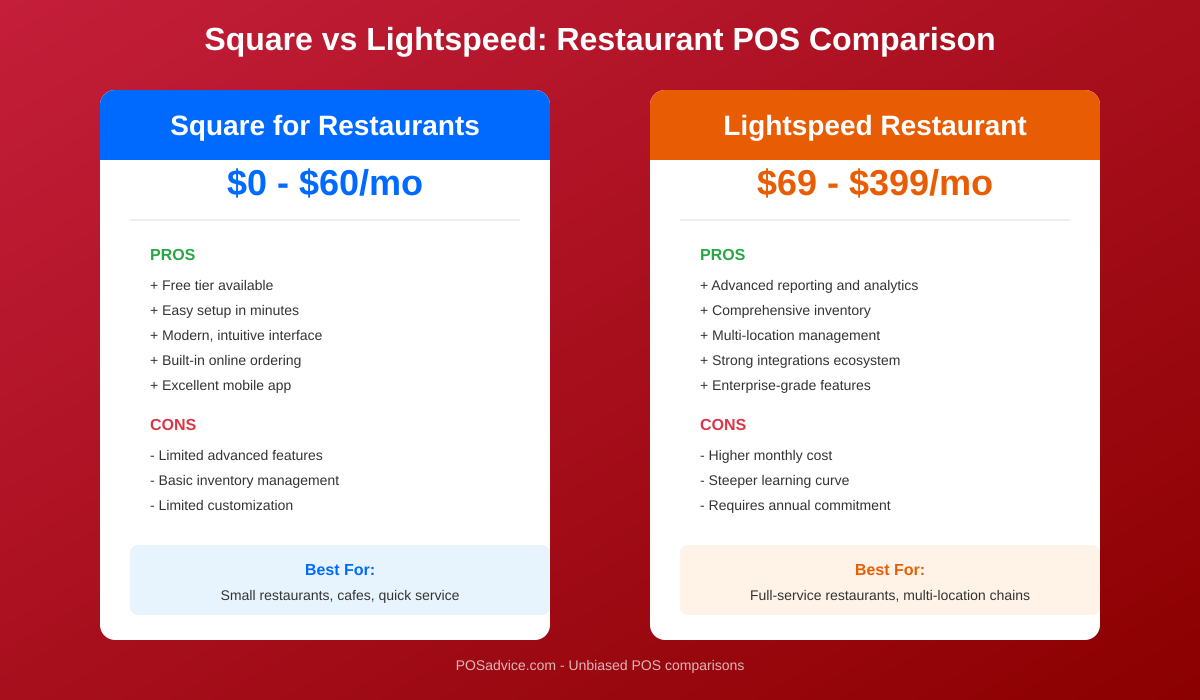
Choose Square if you are a quick-service restaurant, food truck, or single-location establishment seeking an affordable, easy-to-use system with no monthly fees on the basic plan.
Choose Lightspeed if you operate a full-service restaurant, multi-location group, or need advanced inventory management with ingredient-level tracking and comprehensive reporting.
Quick Comparison Summary
| Feature | Square for Restaurants | Lightspeed Restaurant |
|---|---|---|
| Starting Price | $0/month (Free plan available) | $189/month |
| Processing Fees | 2.6% + $0.10 | 2.6% + $0.10 |
| Best For | QSR, food trucks, cafes | Full-service, multi-location |
| Hardware Starting Cost | $0 (BYOD) to $799 | $199 to $1,500+ |
| Contract Required | No contracts | Annual commitment preferred |
| Inventory Tracking | Basic to intermediate | Advanced ingredient-level |
| Kitchen Display System | $20/month (Free on Plus) | Included on all plans |
| Table Management | Plus plan and above | All plans |
| Third-Party Delivery | DoorDash, Grubhub, UberEats | All major platforms |
| 24/7 Support | Premium plan only | All plans |
Pricing: Square vs Lightspeed Monthly Costs
The pricing difference between Square and Lightspeed represents the most significant distinction between these platforms. Square positions itself as accessible to restaurants of any size with its free tier, while Lightspeed targets established restaurants willing to invest in premium features.
Square for Restaurants Pricing (2025)
Free Plan – $0/month per location
- Core POS functionality
- Menu management
- Free online ordering page
- Basic reporting
- Kitchen Display System at $20/month per device
- Email support
Plus Plan – $69/month per location
- Everything in Free
- Unlimited KDS at no extra cost
- Custom floor plans
- Bulk item editing
- Real-time order updates
- Coursing and seat management
- Phone support (6am-6pm PT, M-F)
Premium Plan – $165/month per location
- Everything in Plus
- Seat management
- Reservation management
- Vendor sales reporting
- Lower processing rates (2.4% + $0.15)
- 24/7 phone support
- Ideal for 5+ locations
Lightspeed Restaurant Pricing (2025)
Important Note: Lightspeed recently eliminated its Starter plan. Current pricing starts at the Essential tier.
Essential Plan – $189/month
- Single register included
- Menu management
- Table management and floor plans
- Kitchen Display System included
- Basic reporting
- Third-party delivery integration
- 24/7 support
Plus Plan – $399/month
- Everything in Essential
- Advanced inventory with ingredient tracking
- Multi-location management
- Advanced analytics and reporting
- API access
- Dedicated account manager
Enterprise Plan – Custom Pricing
- Custom feature packages
- Volume discounts
- Dedicated support team
- Custom integrations
Processing Fee Comparison
| Transaction Type | Square | Lightspeed |
|---|---|---|
| In-Person (Card Present) | 2.6% + $0.10 | 2.6% + $0.10 |
| Online Orders | 2.9% + $0.30 | 2.6% + $0.30 |
| Keyed-In Transactions | 3.5% + $0.15 | 3.5% + $0.10 |
| Premium/Volume Rates | 2.4% + $0.15 (Premium) | Custom negotiated |
Pricing Winner: Square
Square wins decisively on pricing accessibility. A new restaurant can start with $0/month and scale up as needed, while Lightspeed requires a minimum $189/month commitment. For restaurants processing under $15,000/month, the Square Free plan offers tremendous value. However, for high-volume full-service restaurants needing advanced features, Lightspeed’s higher cost comes with proportionally greater capabilities.
Restaurant-Specific Features
Both Square and Lightspeed offer purpose-built restaurant features, but their approaches differ significantly. Square prioritizes simplicity and speed, while Lightspeed emphasizes depth and customization.
Order Management
Square for Restaurants
- Quick Order Entry: Intuitive interface designed for fast-paced environments with minimal taps to complete orders
- Order Modes: Supports dine-in, takeout, delivery, and curbside pickup with distinct workflows
- Conversational Ordering: Build orders naturally as customers speak, with easy modifications
- Order Tickets: Automatic kitchen ticket routing with customizable print stations
- Hold and Fire: Control when orders are sent to kitchen (Plus plan and above)
Lightspeed Restaurant
- Advanced Order Building: Complex modifier trees, forced modifiers, and nested options
- Coursing: Full course management with kitchen timing controls
- Order Modes: All major order types plus bar tabs, room service, and event catering
- Self-Service Kiosks: Native support for customer-facing order terminals
- Real-Time Order Tracking: Visual order status across all channels
Table and Floor Management
Square (Plus and Premium plans)
- Drag-and-drop floor plan designer
- Table status indicators (available, occupied, needs attention)
- Table timers to monitor dining duration
- Split checks and transfer tables between servers
- Reservation management (Premium only)
Lightspeed (All plans)
- Multi-floor and multi-room layouts
- Advanced table status with color coding
- Seat-level ordering and billing
- Course timing per table
- Built-in reservation system
- Waitlist management
- Table merge and transfer capabilities
Online Ordering and Delivery
Square
- Free Square Online ordering page included with all plans
- Integration with DoorDash, Grubhub, and UberEats
- Orders consolidated in single POS interface
- QR code ordering for contactless dining
- Pickup scheduling and curbside notifications
Lightspeed
- Native online ordering with custom branding
- All major delivery platform integrations
- Centralized order management dashboard
- Delivery dispatch management
- Customer order tracking
- Integration with Google ordering
Restaurant Features Winner: Lightspeed
Lightspeed offers more sophisticated restaurant-specific features, particularly for full-service environments. The depth of table management, coursing, and seat-level ordering capabilities makes it superior for complex dining operations. Square’s features are excellent for their simplicity but lack the granularity that fine dining and upscale casual restaurants require.
Hardware: Terminal Options and Costs
Hardware requirements represent a significant upfront investment for any restaurant. Both platforms offer proprietary and third-party options, though their approaches differ.
Square Hardware Options
| Device | Price | Financing Option | Best For |
|---|---|---|---|
| Square Reader (Magstripe) | Free (first one) | N/A | Mobile payments, food trucks |
| Square Reader (Chip + Tap) | $49 | N/A | Contactless payments |
| Square Stand | $149 | $14/month | Counter service with iPad |
| Square Terminal | $299 | $27/month | All-in-one portable terminal |
| Square Register | $799 | $39/month | Dedicated dual-screen register |
| Kitchen Display System (iPad) | Use existing iPad | N/A | Digital kitchen tickets |
Square Advantage: You can use your own iOS or Android device with Square, reducing upfront costs significantly. A food truck could start with just an iPhone and the free card reader.
Lightspeed Hardware Options
| Device | Price | Best For |
|---|---|---|
| Lightspeed Lite Server | $199 | Local network reliability |
| iPad Stand Kit | $299 | Counter service POS station |
| Payment Terminal | $299 | Integrated card processing |
| Kitchen Display System | $499 | Included with subscription |
| Complete Station Bundle | $1,200 – $1,500 | Full counter setup |
| Receipt Printer | $299 – $399 | Kitchen and customer receipts |
| Cash Drawer | $119 – $149 | Cash management |
Lightspeed Advantage: The Lite Server provides local network redundancy, keeping your restaurant operational even if internet connectivity drops temporarily.
Third-Party Hardware Compatibility
Square: Works with most standard receipt printers, cash drawers, and kitchen printers that connect via USB or Bluetooth. Supports major brands including Star Micronics and Epson.
Lightspeed: Certified hardware list includes Epson, Star Micronics, and Zebra. The iOS app works with iPads, while Android support is more limited.
Hardware Winner: Square
Square wins on hardware flexibility and cost. The ability to start with existing devices and scale up incrementally makes it accessible for new restaurants. Lightspeed’s hardware is professional-grade but requires more upfront investment. For established restaurants comfortable with the investment, Lightspeed’s dedicated hardware performs excellently.
Inventory and Menu Management
Inventory management can make or break restaurant profitability. Both systems offer inventory tools, but their depth varies significantly.
Square Inventory Features
- Menu Categories: Organize items by course, daypart, or custom groupings
- Modifiers and Variations: Create modifier groups (toppings, sizes, preparations) with pricing
- Item Stock Tracking: Track stock levels for finished items
- Low Stock Alerts: Notifications when items run low
- 86’d Items: Quickly mark items as unavailable across all channels
- Bulk Menu Editing: Update multiple items simultaneously (Plus plan)
- Menu Scheduling: Different menus for different dayparts
- Photo Support: Add images to menu items for online ordering
Limitation: Square does not offer native ingredient-level tracking. You cannot automatically deduct flour inventory when a pizza is sold, for example.
Lightspeed Inventory Features
- Ingredient-Level Tracking: Define recipes with exact ingredient quantities
- Automatic Deduction: Ingredients deducted from inventory with each sale
- Food Cost Calculation: Real-time cost per dish based on ingredient prices
- Recipe Management: Store and manage recipes with scaling
- Supplier Management: Track suppliers with pricing and order history
- Purchase Orders: Create and track purchase orders directly in POS
- Waste Tracking: Log and analyze food waste by reason
- Par Level Alerts: Automatic reorder notifications
- Inventory Counts: Mobile inventory counting with variance reporting
- Menu Engineering: Identify profitable vs. underperforming items
Menu Management Comparison
| Feature | Square | Lightspeed |
|---|---|---|
| Categories and Subcategories | Yes | Yes |
| Modifiers with Pricing | Yes | Yes |
| Forced Modifiers | Yes | Yes |
| Nested Modifiers | Limited | Advanced |
| Ingredient-Level Tracking | No (third-party needed) | Yes (native) |
| Recipe Costing | No | Yes |
| Menu Scheduling | Yes | Yes |
| Multi-Location Menu Sync | Yes | Yes |
Inventory Winner: Lightspeed
Lightspeed dominates inventory management with its native ingredient-level tracking and recipe costing. For restaurants serious about controlling food costs and managing inventory accurately, Lightspeed is the clear choice. Square’s inventory works for tracking finished items but lacks the depth needed for true kitchen inventory management.
Reporting Comparison
Data-driven decision making requires robust reporting. Both platforms offer analytics, but with different focuses and depths.
Square Reporting
- Sales Reports: Daily, weekly, monthly, and custom date ranges
- Item Performance: Best and worst sellers by revenue and quantity
- Labor Reports: Hours worked, labor cost percentage
- Payment Reports: Breakdown by payment type
- Category Analysis: Performance by menu category
- Modifier Reports: Track popular customizations
- Discount Tracking: Monitor discount usage and impact
- Comp and Void Reports: Track comps and voids by employee
- Real-Time Dashboard: Live sales tracking
- Export Options: CSV exports for external analysis
Lightspeed Reporting
- Advanced Sales Analytics: Multi-dimensional sales analysis
- Food Cost Reports: Real-time cost percentages by item and category
- Ingredient Usage: Track actual vs. theoretical usage
- Waste Analysis: Waste reports by reason and item
- Labor Analytics: Labor cost as percentage of revenue by daypart
- Server Performance: Sales per server, average check, tips
- Table Turn Times: Analyze table utilization and dining duration
- Multi-Location Comparison: Compare performance across locations
- Inventory Reports: Stock levels, usage rates, variance
- Custom Report Builder: Create custom reports with selected metrics
- Scheduled Reports: Automatic email delivery of key reports
- API Access: Pull data into business intelligence tools
Reporting Winner: Lightspeed
Lightspeed’s reporting suite is substantially more comprehensive, particularly for financial analysis and multi-location operations. The food cost reporting alone justifies the premium for restaurants focused on margin management. Square’s reporting covers essentials well but lacks the depth for sophisticated analysis.
Integrations Comparison
Modern restaurants rely on multiple systems working together. Integration capabilities determine how well your technology ecosystem functions.
Square Integrations
Accounting
- QuickBooks Online (native)
- Xero
- FreshBooks
Delivery and Online Ordering
- DoorDash
- Grubhub
- UberEats
- Postmates
- ChowNow
Staff Management
- Square Team (native)
- Homebase
- Deputy
- 7shifts
Reservations
- Yelp Reservations
- Reserve
Marketing
- Square Marketing (native)
- Mailchimp
Lightspeed Integrations
Accounting
- QuickBooks
- Xero
- Sage
Delivery and Online Ordering
- DoorDash
- UberEats
- Grubhub
- Skip the Dishes
- Deliverect
Staff Management
- 7shifts
- Push Operations
- Planday
Reservations
- OpenTable
- Resy
- Yelp
Marketing and Loyalty
- Mailchimp
- Lightspeed Advanced Marketing
- Como
Payment Processing
Important: Lightspeed strongly encourages (and sometimes requires) Lightspeed Payments. Using third-party processors can add up to $400/month in additional fees.
Integrations Winner: Tie
Both platforms offer robust integration ecosystems covering essential restaurant needs. Square has a slight edge with more native features reducing the need for third-party tools. Lightspeed offers deeper integrations with premium reservation platforms like OpenTable and Resy. The winner depends on which specific integrations your restaurant needs.
Customer Support
When your POS goes down during dinner service, support responsiveness matters enormously. Here is how both platforms compare.
Square Support
| Plan | Support Options |
|---|---|
| Free | Email support, knowledge base, community forums |
| Plus | Phone support 6am-6pm PT, Monday-Friday; chat support |
| Premium | 24/7 phone support; dedicated account manager for large accounts |
Additional Resources: Square offers extensive self-service resources including video tutorials, step-by-step guides, and an active seller community.
Lightspeed Support
| Plan | Support Options |
|---|---|
| All Plans | 24/7 chat support; phone support daily |
| Plus and Enterprise | Dedicated account manager; priority support queue |
Additional Resources: Lightspeed provides free onboarding assistance, training webinars, and implementation support for new customers.
Support Winner: Lightspeed
Lightspeed wins on support availability, offering 24/7 assistance on all plans. Square’s free plan support limitations could leave restaurants struggling during critical moments. For restaurants prioritizing reliable support, Lightspeed’s inclusive 24/7 support is valuable.
Winner by Restaurant Category
The best POS depends heavily on your restaurant type, size, and operational priorities. Here are our recommendations by category.
Quick-Service Restaurants (QSR)
Winner: Square
- Fast, intuitive interface optimized for speed
- Free plan suitable for low-volume operations
- Excellent online ordering integration
- Hardware flexibility for various setups
- Simple menu management for limited menus
Full-Service Restaurants (FSR)
Winner: Lightspeed
- Advanced table and floor management
- Coursing and kitchen timing controls
- Seat-level ordering and billing
- Comprehensive reservation system
- Server performance tracking
Multi-Location Restaurant Groups
Winner: Lightspeed
- Centralized multi-location management
- Cross-location reporting and comparison
- Enterprise-level inventory controls
- Dedicated account management
- Custom pricing for volume
Best Value for Single-Location Restaurants
Winner: Square
- Free plan with robust features
- No long-term contracts
- Affordable hardware options
- Scales with your growth
- All-in-one ecosystem
Food Trucks and Mobile Operations
Winner: Square
- Works on smartphones
- Durable, portable hardware
- Offline mode capability
- Battery-powered terminal options
- Free plan perfect for limited menus
Cafes and Coffee Shops
Winner: Square
- Fast checkout for high-volume transactions
- Excellent tip handling
- Simple menu management
- Affordable for tight margins
- Strong loyalty program options
Bars and Nightclubs
Winner: Lightspeed
- Tab management and pre-authorization
- Drink recipe and pour cost tracking
- Age verification features
- Inventory tracking for liquor
- Speed screens for bartenders
Overall Recommendation Summary
| Choose Square If | Choose Lightspeed If |
|---|---|
| You prioritize low startup costs | You need advanced inventory management |
| You run a QSR, food truck, or cafe | You operate a full-service restaurant |
| You want contract-free flexibility | You have multiple locations |
| You prefer simple, intuitive software | You need detailed reporting and analytics |
| You are just starting out | You are established and scaling |
Frequently Asked Questions
Can I switch from Square to Lightspeed (or vice versa)?
Yes, both platforms allow you to export your data. Lightspeed offers migration assistance for restaurants switching from other systems. However, you will need to rebuild your menu in the new system and retrain staff. Plan for at least 2-4 weeks for a smooth transition.
Which system has better offline capabilities?
Both systems can process payments offline, but Lightspeed’s Lite Server provides more robust offline functionality. Square’s offline mode is limited to card payments and requires reconnection to sync. For restaurants in areas with unreliable internet, Lightspeed’s local server option provides greater reliability.
Can I use my own payment processor with these systems?
Square requires using Square’s payment processing with no exceptions. Lightspeed allows third-party processors but charges up to $400/month additional fees, making it impractical for most restaurants. Both platforms are essentially payment processing locks.
Which POS is better for high-volume restaurants?
Lightspeed handles high-volume environments better with its advanced kitchen routing, coursing, and multiple terminal synchronization. However, Square’s Plus and Premium plans can handle significant volume for QSR environments where speed rather than complexity matters.
Do either offer inventory tracking for ingredients?
Only Lightspeed offers native ingredient-level tracking with recipe management. Square tracks finished item quantities but not ingredient deduction. Square users needing ingredient tracking must use third-party integrations like MarketMan or BlueCart.
What happens if I outgrow the Square Free plan?
Upgrading from Square Free to Plus is seamless and can be done instantly from your dashboard. Your data, menu, and settings transfer automatically. You simply start getting billed monthly and gain access to advanced features immediately.
Is Lightspeed worth the higher cost?
For full-service restaurants with complex menus and serious about food cost management, yes. The ingredient tracking alone can save 3-5% on food costs, easily justifying the monthly fee. For simpler operations, the additional cost may not provide proportional value.
Which system is easier to learn?
Square is consistently rated easier to learn, with most staff productive within 1-2 hours. Lightspeed requires more training due to its feature depth, typically 4-8 hours for full proficiency. Both offer training resources and onboarding support.
Can I get a demo or trial?
Square offers a 30-day free trial of its Plus plan, and the Free plan is permanently free. Lightspeed offers a 14-day free trial with full feature access. Both offer live demos with sales representatives.
Which is better for a restaurant just starting out?
Square is the clear choice for new restaurants. The free plan allows you to launch without software costs, and you can upgrade as you grow. The no-contract approach reduces risk if your restaurant concept changes or closes.
Final Verdict
Both Square and Lightspeed are excellent restaurant POS systems, but they serve different segments of the market.
Square for Restaurants excels at accessibility, affordability, and simplicity. It is the ideal choice for quick-service restaurants, food trucks, cafes, and new restaurant owners who need professional POS capabilities without significant upfront investment.
Lightspeed Restaurant dominates in feature depth, particularly for inventory management, reporting, and multi-location operations. It is the superior choice for full-service restaurants, bar and grill concepts, and restaurant groups that need sophisticated operational controls.
Your decision should ultimately come down to three factors: your restaurant type, your budget, and your growth trajectory. If you are unsure, start with Square’s free trial or free plan to understand your actual needs, then evaluate whether Lightspeed’s additional capabilities justify the investment as you scale.
Our Testing Methodology
This comparison is based on hands-on testing of both platforms in real restaurant environments, analysis of public pricing and feature documentation, interviews with restaurant owners using each system, and review of customer feedback across multiple platforms. Pricing and features are current as of December 2025 but may change. We recommend confirming current pricing directly with each vendor before making your decision.